What is the Game Book?
Your game’s living record: the hero, places, characters and factions, and how to open it on any screen.
Last updated 17 days ago
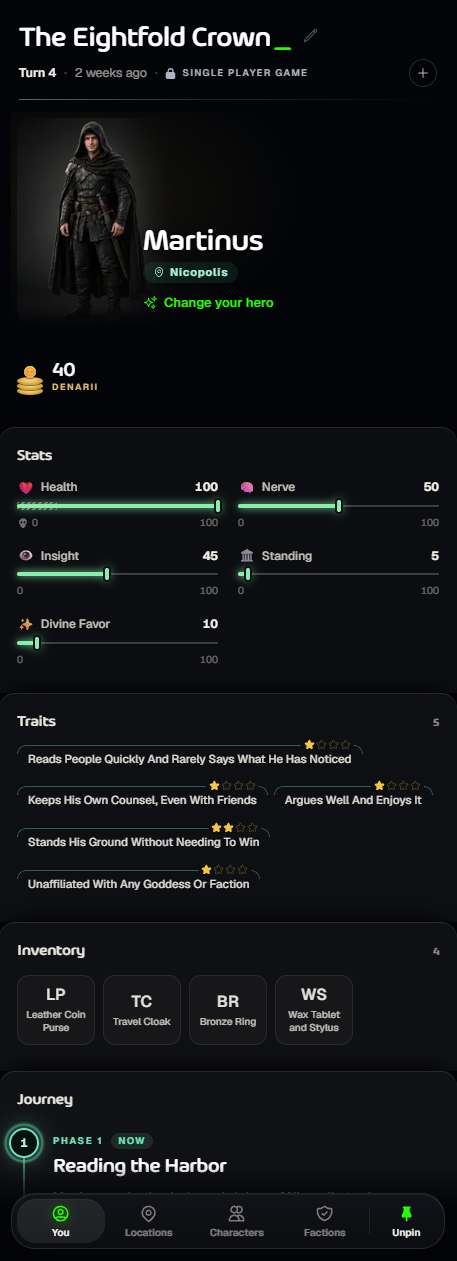
The Game Book is your game’s living record: your hero, where you’ve been, who you’ve met and the groups that matter. It updates by itself after every turn.
Open it
On a wide screen it sits beside the story. Use the pin at the bottom (Unpin) to fold it away, or turn on Always show gamebook in the game settings.
On a phone or smaller screen, tap Gamebook next to the box where you type.
The four tabs
You: your hero’s picture (Change your hero or Picture your hero), money, stats, traits and inventory, then your Journey: the phases or steps of the story and where you are now. Kingpin games show the Rankings here instead.
Locations: where you are now, who is there with you and what’s lying around, then the places you’ve been. Still to discover marks places you haven’t found yet.
Characters: everyone you’ve met, grouped by how they feel about you. Open one to read their background and what they remember about you.
Factions: the groups in the world, their mission and background.
Good to know
Story games have no stats or inventory, so the You tab is shorter.
Traits show stars: they grow as you keep acting that way.
New to playing? See Playing a Game: Turns, Dice and Fights.
Was this helpful?
Still need help? Ask the team