Playing a Game: Turns, Dice and Fights
How to take a turn, what skill checks and showdowns are, the tools on every turn, and the game settings.
Last updated About 1 hour ago
A game plays in turns. You say what your hero does, the story answers, and the world keeps track of everything that changes. Here’s everything on the play screen and how it works.
Take a turn
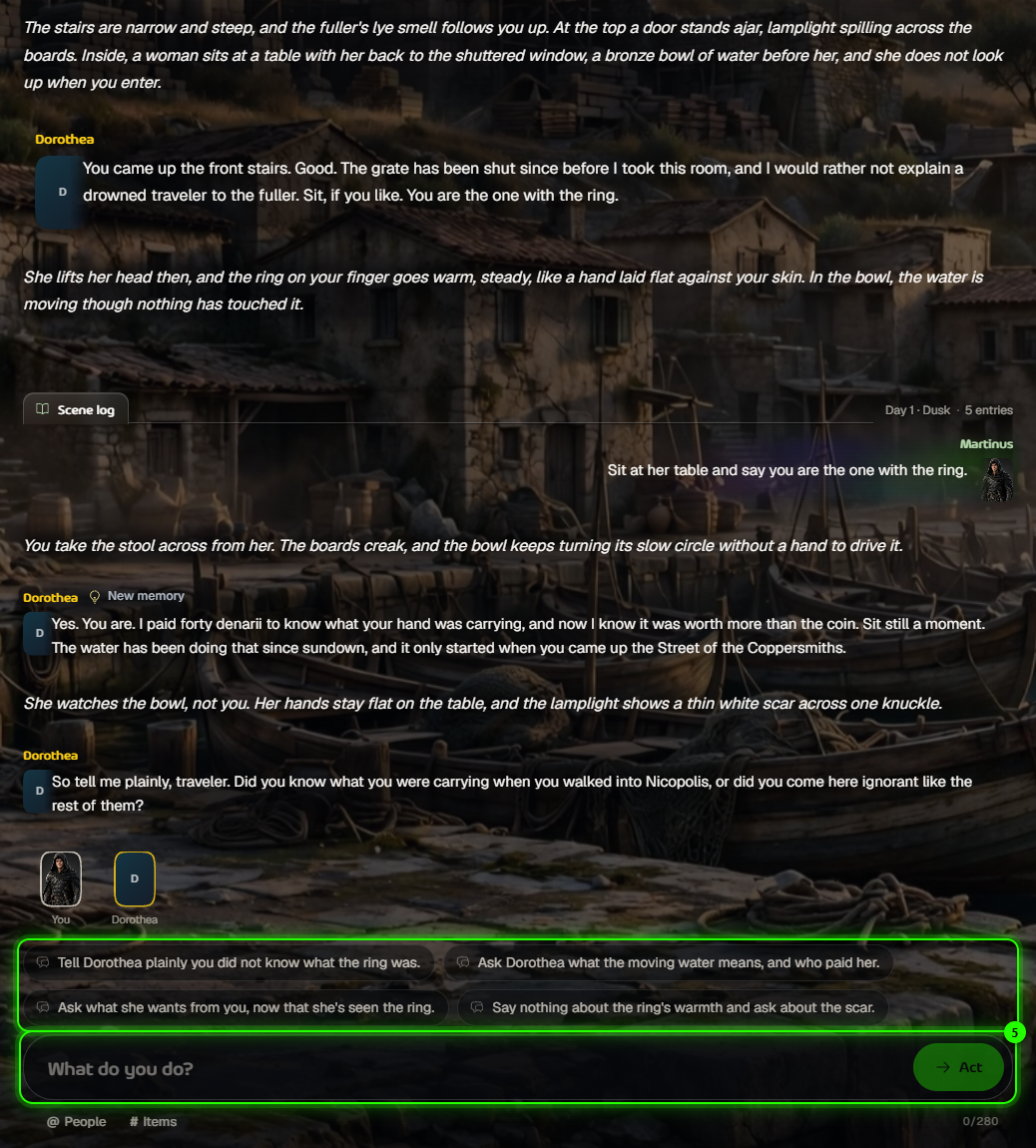
Suggested actions: tap one to play it straight away. The icon shows what kind of move it is, a risk word (Med, High, Extreme) warns you when it’s dangerous, and an arrow means it moves the scene on.
What do you do?: type anything, up to 280 characters, and press Act.
Type @ or use @ People to speak to someone (up to 4 at once), and # or # Items to use something you carry.
Some turns are quick exchanges, like a chat with someone in the scene. Others move the story into a new scene. aiga_ decides which, based on what you did.
Dice and skill checks
When you try something risky, a Skill check appears and the dice roll from 0 to 100. The result can be a fail, a Near Miss, a Partial Success or a Success. Open Roll details to see what shaped the roll, including the traits that helped you.
Fights (Showdowns)
A fight plays out over several rounds. Each round you pick a move or write your own, and you can try to end it another way, for example by talking or getting away. How dangerous fights are depends on the game’s Showdown setting:
Heroic: fights can beat you, but never kill you.
Balanced: a killing blow brings you to death’s door, and you choose your fate.
Perilous: a killing blow is final.
Off: fights are settled in a single roll.
Tools on every turn
Listen: have the turn read aloud. The price is on the button, and replaying is free.
Paint this scene: add a picture. See How does image generation work during gameplay?.
Rewind: go back to the start of an earlier turn. Later turns are moved to Rewind history. Not available in Kingpin or community games.
Game settings
The gear at the top right of the game opens its settings.
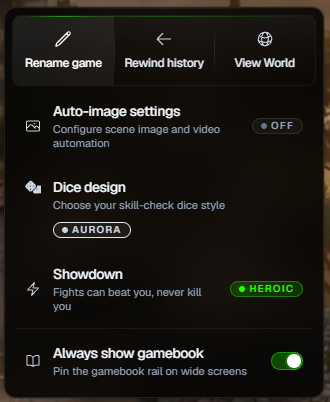
Rename game, Rewind history and View World.
Auto-image settings: paint every new scene automatically.
Dice design: choose the dice you roll with.
Showdown: change how dangerous fights are. A fight in progress keeps its setting.
Always show gamebook: keep the Game Book open beside the story on wide screens.
Coming back and finishing
Your game saves after every turn. Come back after a while and a Welcome back card reminds you where you were.
When a story ends, you’ll see Victory, Game Over or Story Concluded. You can rewind to an earlier checkpoint to try again, or go back to your games.
Free accounts get 4 free turns a day; paid plans include all text play. See Subscriptions: Plans and What They Offer.
Was this helpful?
Still need help? Ask the team