Credits: What They Pay For and How to Buy More
What uses credits with and without a plan, how to buy a pack, and where to see your balance and history.
Last updated About 1 hour ago
Credits pay for what your games create: pictures, videos and narration, and turns once your free turns are used up. Your balance is always shown at the bottom of the left sidebar.
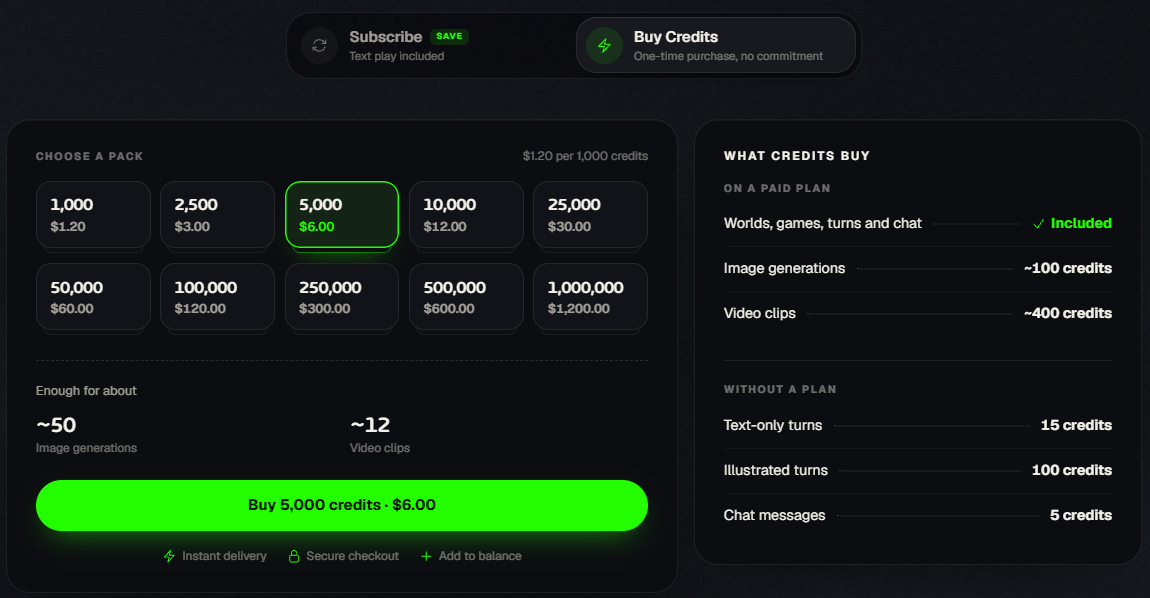
What things cost
Other things that use credits: narration with Listen (the price shows on the button), a hero picture you generate in My Images (25), and pictures you make for your worlds (50 each). Every price is shown before you spend anything.
Playing a Sponsored shared world is free: its creator pays.
Buy credits
Open Pricing and switch to Buy Credits.
Choose a pack, from 1,000 credits ($1.20) to 1,000,000 ($1,200). Every pack is $1.20 per 1,000 credits.
Click Buy and pay. The credits are added to your balance right after checkout.
You don’t need a subscription to buy credits, and packs work alongside any plan.
Monthly credits from a plan
Bronze, Silver and Gold add media credits to your balance every month when your plan renews. They go into the same balance as credits you buy.
See where your credits went
Go to Account → Settings & Billing → Credit History for everything you’ve spent and received. Card payments are under Billing History.
Earn credits too: invite friends with your referral link. See Referral Program: Earn Credits.
Was this helpful?
Still need help? Ask the team