Sponsorship: Let Players Play for Free
Pay for other players’ games in your shared world: funding, what it covers, managing the pool and what players see.
Last updated About 1 hour ago
Sponsorship lets you pay for other players’ games in your shared world, so they can play it for free. It’s the quickest way to get new players into a world you’re proud of.
How it works
You move credits from your balance into your world’s sponsorship pool.
When someone plays your world, the pool pays for their story turns, chats and game pictures instead of their own credits.
Voice narration is only covered if you switch on Cover voice narration.
When the pool runs out, sponsorship switches off. Players are asked before their own credits are used to carry on.
Fund your world
Sponsorship becomes available once your world is shared.
Open your world and go to its Share screen.
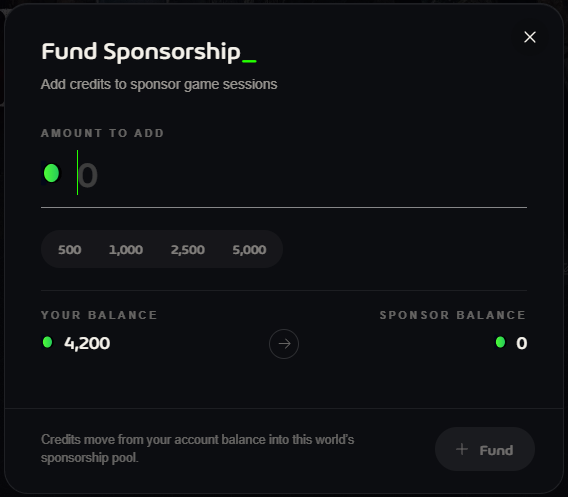
Under Sponsorship, click Fund.
Pick an amount (500, 1,000, 2,500 or 5,000) or type your own, then click Fund.
Manage it
Pause sponsorship / Resume sponsorship: stop paying for new play for a while. The remaining credits stay reserved.
Withdraw: move unused credits back to your balance.
Transactions: see what your sponsorship has paid for.
Cover voice narration: also pay for players’ narration.
When you visit your own world’s public page, a bar shows how many sponsorship credits are left, with a shortcut to Manage sharing.
What players see
A Sponsored tag on your world’s card, with the credits left.
A Play FREE button instead of Play.
Your world shows up under the Free Play filter in Shared Worlds and in Sponsored Worlds on Home.
Good to know: withdraw unused credits before you stop sharing a world. Sponsorship credits left in a pool are lost if you delete your account.
New to sharing? Start with How to Share a World.
Was this helpful?
Still need help? Ask the team